Pudu vs OrionStar Robots: How to Choose the Right Service Robot
The better-known brand isn’t automatically the better fit for your venue. When comparing Pudu vs OrionStar robots, start with the job you need done and the exact models under consideration, not a general impression of either manufacturer. A robot suited to one setting or task may not suit another.
Brand comparisons can hide important differences between models. A headline specification may not show whether a robot fits your routes, daily workflow or staff hand-offs. Separate the robot’s documented capabilities from what a supplier provides during deployment and afterwards. If a detail is missing, record it as a question to resolve rather than assuming it applies.
Use this guide to build a practical comparison around your venue, intended tasks and support requirements. GO Robotics supplies Pudu robots, including delivery and cleaning models, and offers site surveys, recommendations, installation, mapping, commissioning and staff training. For an OrionStar candidate, confirm the exact model and its supplier arrangements before comparing. The aim is a decision based on evidence that applies to your venue, not broad brand claims.
Key Takeaways
- Compare Pudu vs OrionStar robots by exact model and intended task, not by assuming one brand suits every venue.
- Use the same checklist for both candidates, covering tasks, routes, access, interaction, management and operating conditions.
- Separate guest-facing tasks from back-of-house movement when assessing how a robot would fit your daily workflow.
- Ask who will survey and map the site, commission the robot, train staff and handle UK support enquiries.
- Shortlist models using documented evidence, and keep unconfirmed details visible as open questions.
Pudu vs OrionStar robots: why the exact model matters more than the brand
Start with the work you need done, your venue layout and the support you expect after installation. The service robot category covers a wide range of uses. A brand name alone cannot tell you whether two particular models are designed for the same task or suit the same working environment.
Pudu and OrionStar both have product ranges, so identify the exact models before you compare them. A useful Pudu vs OrionStar robots assessment should match candidates on intended task, then check their current manufacturer documents and supplier proposals. Avoid applying a specification from one model to another, even when they share a brand.
What does a fair Pudu-versus-OrionStar comparison include?
Keep three types of evidence separate. Manufacturer documents describe a model’s stated capabilities and conditions. Supplier information sets out what is included in supply, setup and support. Independent evidence can help you assess how a candidate performs in conditions like yours. An installation or training service is not a robot feature, and a specification is not a promise of results in your venue.
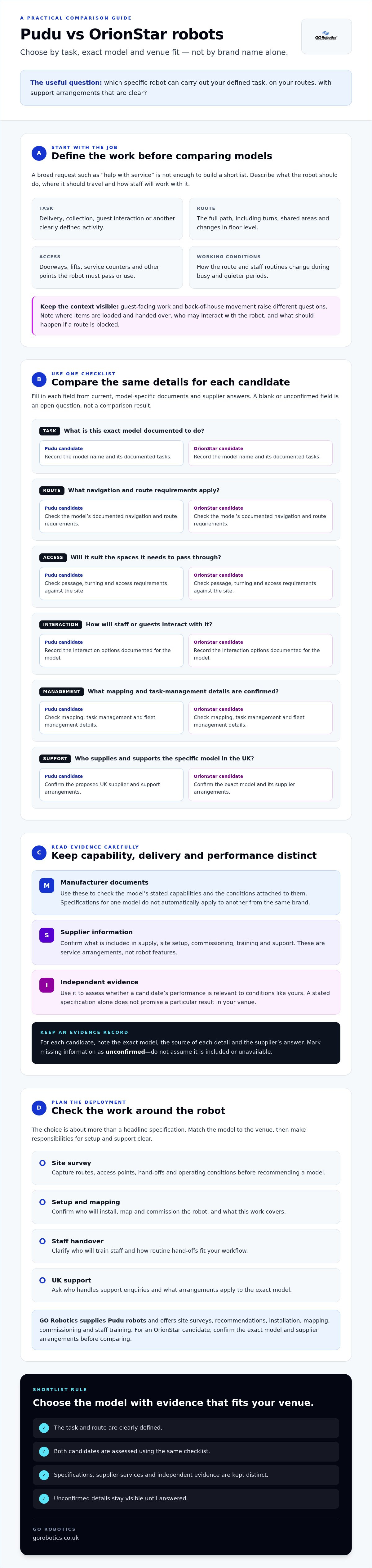
Create one comparison record for each candidate. Include the exact model name, the document title and date, and the supplier’s answers to your questions. If a detail is missing, record it as unconfirmed. Don’t treat an omission as proof that the robot cannot do something, or assume the feature is included.
Which venue tasks should shape the shortlist?
Define the job precisely. “Help with service” is too broad to guide a shortlist. Write down what the robot should carry out, where a run starts and ends, and which staff routines it is intended to assist. The goal is to support repetitive work, not to assume a robot will replace staff.
- Task: Delivery, collection, guest interaction or another clearly defined activity.
- Route: The full path, including turns, shared areas and changes in floor level.
- Access: Doorways, lifts, service counters and other points the robot must pass or use.
- Conditions: How the route changes during busy periods, quieter periods and routine operations.
Separate guest-facing work from back-of-house movement. A route through a dining area raises different questions from a staff-only route between service points. Note where items are loaded and handed over, who may need to interact with the robot, and what should happen if a route is blocked. A site survey can help capture these details before you compare candidates.
Compare Pudu and OrionStar robot capabilities against your daily workflow
Make the comparison model-specific and use current manufacturer documents for both candidates. GO Robotics supplies Pudu models, including BellaBot, but specifications vary by model. OrionStar specifications and UK supplier arrangements must be checked for the specific candidate. The table below is a working template: fill it with confirmed details rather than treating blank or unverified fields as a comparison result.
| Workflow check | Pudu candidate | OrionStar candidate |
|---|---|---|
| Task | Record the exact model and its documented tasks. | Record the exact model and its documented tasks. |
| Route | Document navigation and route requirements for the model. | Document navigation and route requirements for the model. |
| Access | Check passage, turning and access requirements against the site. | Check passage, turning and access requirements against the site. |
| Interaction | Record documented options for staff or guests. | Record documented options for staff or guests. |
| Management | Check mapping, task management and fleet management details. | Check mapping, task management and fleet management details. |
| Support | Confirm the proposed UK supplier and support arrangements. | Confirm the proposed UK supplier and support arrangements. |
Which specifications affect a real venue deployment?
Focus on figures that affect the task. If the robot carries items, check its documented payload and tray or compartment layout. If it must move through specific areas, check passage and turning requirements. For a robot running repeated tasks, review runtime, charging arrangements and the conditions behind any stated figures. These details are model-specific, not brand-wide defaults.
Measure the route, including doorways, corridors, lifts and turning spaces, and compare those measurements with the documentation for the exact model. Check whether the stated coverage and operating conditions suit your schedule. Site mapping creates a digital layout used for navigation, so ask who completes it, how route changes are handled and what happens if furniture or access arrangements change.
How should interaction and navigation claims be assessed?
Match documented interaction options to the people who will use the robot. Ask how it detects obstacles, follows routes and responds when a route changes. Similar marketing language does not prove that two models use equivalent sensors or behave alike in your venue. Ask for a demonstration on a representative route if the navigation behaviour is important to your decision.
The global service robot sales reporting from the International Federation of Robotics offers wider market context, but it cannot confirm whether a particular model suits your workflow. In a Pudu vs OrionStar robots comparison, a feature matters when it supports the task and conditions you have defined. A shorter list of relevant, documented capabilities can be more useful than a longer list of general claims.
A site survey can help document routes and access points before you shortlist models. Discuss a site survey to assess a Pudu candidate against your venue requirements.
Choose a Pudu or OrionStar robot by task, venue and operating conditions
Use a decision sequence instead of beginning with a brand preference. Define the task, record the site conditions, shortlist named models, test the evidence, then assess the supplier’s deployment and support arrangements. Different robot categories cannot be ranked fairly by one specification. A payload figure, for example, tells you little about a candidate intended for a different task.
- Define the task. Write down what the robot should do, where each run starts and ends, and which staff actions it should assist with.
- Inspect the site. Record the route, operating area, access points and likely obstacles with the people who use that space.
- Shortlist models. Compare candidates only after confirming their exact names and current manufacturer documents.
- Test the evidence. Check whether the stated capabilities address your task and conditions, and note assumptions that need testing.
- Assess support. Confirm who will handle site assessment, mapping, commissioning, staff training and support enquiries.
How do you match the robot to the venue?
Separate guest-facing work from back-of-house movement. A robot operating near guests needs to fit around changing activity and staff interactions. A staff-only route has its own access and hand-off requirements. Boston University’s discussion of the rise of service robots in the hospitality industry offers broader context, but your operating process should shape the shortlist.
Walk the proposed route with the venue team. Note where staff load or unload items, where someone may need to intervene, and what should happen if a destination or route is unavailable. A site assessment can help test access and route assumptions before you select a model.
Worked comparison template
- Task and hand-offs: [task] | [staff actions before, during and after a run]
- Venue and route: [operating area] | [route and access points] | [likely obstacles]
- Candidate models: Pudu [exact model] | OrionStar [exact model]
- Evidence to test: [manufacturer document and date] | [demonstration or site assessment]
- Open questions: [mapping or integration assumptions] | [deployment and support arrangements]
When is a demonstration or site assessment useful?
A demonstration is useful when you need to see how a model handles the task and staff workflow, rather than judging appearance alone. Ask the supplier to identify what depends on site mapping or integration. Record unanswered technical and service questions beside each candidate. A site assessment is especially helpful when route access, hand-offs or operating conditions remain uncertain. Resolve those gaps before treating the models as directly comparable.
Check documentation, deployment and UK support before choosing
Published capabilities are only part of the decision. For a fair Pudu vs OrionStar robots comparison, ask each supplier to document the exact model, deployment plan and aftercare arrangements. You can then distinguish what is confirmed, what depends on your venue and who is responsible at each stage.
What should you ask each supplier to document?
Use the same checklist for each named candidate. Keep the answers alongside the manufacturer documents, so you can compare the same points rather than relying on broad brand claims.
- Model and specifications: Request the exact model name, current manufacturer documentation and any conditions attached to figures such as runtime or payload.
- Task and integrations: Ask which tasks are documented for the model. Separate confirmed integrations from those that require further assessment.
- Deployment: Confirm who surveys the venue, maps routes, installs and commissions the robot, and checks the proposed operating area.
- Staff familiarisation: Ask what training is provided, who should attend and what staff need to know for daily use.
- Aftercare: Get maintenance and technical support arrangements in writing. Confirm how to raise an issue, who handles it and what any warranty covers.
An unanswered point is not automatically a limitation or an advantage. Record it as an open question and ask the supplier to resolve it before deciding.
How can UK deployment support affect the decision?
Check whether the supplier can assess your venue and provide a written recommendation. Clarify who is responsible for site mapping, commissioning and staff training, and ask what ongoing support is available for the specific model. Compare those arrangements directly. Do not assume that two suppliers provide the same coverage or that a manufacturer’s support applies locally.
GO Robotics supplies Pudu models in the UK and offers site surveys, written recommendations, installation, mapping, commissioning, staff training and ongoing technical support. Its range includes delivery and cleaning robots, with options such as purchase and a Robots-as-a-Service subscription. Confirm which models and services are available under the arrangement you are considering.
GO Robotics does not list OrionStar among the models it supplies. If you are assessing an OrionStar candidate, confirm its UK supplier, availability, deployment process and support arrangements with the relevant provider. Compare what is included, such as mapping, training and aftercare, rather than assuming that similarly named services cover the same work.
To discuss your venue and robot requirements, contact GO Robotics about a site survey.
Make the Pudu-versus-OrionStar decision with a model-specific shortlist
There is no sound brand-wide winner without comparable evidence for the task you need done. Complete your Pudu vs OrionStar robots assessment by naming the exact models, checking their documented capabilities against your site and weighing the supplier support you can confirm. Count a feature as relevant only when the evidence applies to that model and your intended use.
What belongs in the final comparison scorecard?
Use the same criteria for each candidate. Score only points confirmed by documentation or the supplier, and leave a field unscored if evidence is missing. Keep operating requirements separate from brand reputation and promotional claims.
- Task fit: Does the manufacturer document the task you need the robot to assist with?
- Site access: Are the routes and access points supported by model-specific evidence and a site assessment?
- Documented capabilities: Do the stated specifications match your workload, and are their conditions clear?
- Integration needs: Are the required connections confirmed for this model, or do they need further assessment?
- Support clarity: Do you know who handles deployment, staff training, maintenance and support enquiries?
Record the evidence beside each score, including the document or supplier response it came from. If a model has an unverified integration or unclear support arrangements, keep that as an open item rather than marking it as a failure. The result should be a practical shortlist, not just a ranking of claims.
What should you prepare before speaking to a supplier?
Prepare a short description of your venue and the task you want the robot to assist with. Include operating hours, main routes, access constraints and any lift, door or software integrations you may need. Note where staff hand over items or may need to intervene. This gives the supplier enough context to discuss the real workflow rather than a general use case.
GO Robotics supplies listed Pudu models in the UK and can assess a Pudu candidate against your requirements. For an OrionStar model, confirm its exact name, current manufacturer documents, UK availability and supplier support arrangements directly with the relevant provider. Ask for a site assessment and recommendation tied to the specific models under consideration.
With your task, routes and access requirements ready, discuss your venue and robot requirements with GO Robotics.
Choose the model that fits your venue
The right choice depends on the task, route and operating conditions, not the brand name alone. In a Pudu vs OrionStar robots comparison, shortlist exact models and assess only capabilities supported by current documentation. Keep unconfirmed details open until the relevant manufacturer or supplier provides an answer.
Assess site suitability and support alongside the specifications. Who will map and commission the robot, train staff and handle support enquiries? These practical details help you judge whether a model can assist with your workflow and what needs arranging before it goes into service.
GO Robotics supplies Pudu models across the UK, with site surveys, written recommendations, installation, mapping, commissioning and staff training. To assess your venue and discuss a suitable Pudu model, discuss your venue and compare suitable robot models with GO Robotics. For an OrionStar candidate, confirm its documentation and UK supply and support arrangements with the relevant provider.
Bring your task, routes and access requirements to the discussion. A clear brief is a practical first step towards choosing with confidence.
Frequently Asked Questions
Is Pudu better than OrionStar for hospitality venues?
Not necessarily. The right choice depends on the exact model, task, venue layout and support available, not the brand name alone. For hospitality, define whether you need help with delivery, cleaning or another task, then check each candidate’s current manufacturer documents and fit with your routes and staff workflow. Compare supplier arrangements separately, including who handles installation, training and ongoing support in the UK.
What is the difference between Pudu and OrionStar robots?
The difference depends on which models you compare. Both brands have product ranges, so brand-level descriptions cannot establish whether two specific robots share the same tasks, specifications or software functions. Name the candidate models and compare their current manufacturer documents side by side. Check features against your intended work, and treat missing details as questions to confirm rather than evidence that one brand is better.
Can Pudu and OrionStar robots do the same tasks?
Some models may be intended for similar tasks, but do not assume every Pudu and OrionStar robot can do the same work. Check the manufacturer’s documentation for each exact model and confirm its stated tasks, operating conditions and required integrations. Delivery, cleaning and guest interaction can involve different capabilities. Test the relevant workflow with the supplier before treating two candidates as interchangeable.
How do I compare Pudu and OrionStar robot specifications?
Start with exact model names and current manufacturer documents. Compare relevant measures such as payload, passage requirements, runtime and speed only when they are documented for both candidates, and note any conditions attached to each figure. A maximum or test result is not automatically an expected result in your venue. Check route access, charging arrangements and task requirements, and leave a field unscored if evidence is missing.
What should a UK business check before choosing a service robot?
Check that the named model’s documented task and operating conditions fit your venue. Review routes, doorways, corridors, lifts and any software integrations you require. Then confirm who will survey the site, map and commission the robot, train staff and handle support enquiries. Ask the supplier to set out maintenance and aftercare arrangements in writing. For an OrionStar candidate, confirm UK availability and support with the relevant supplier.
Does GO Robotics supply OrionStar robots?
OrionStar is not among the models GO Robotics lists as supplied. GO Robotics supplies Pudu models, including BellaBot, alongside other listed commercial robots. If you are considering an OrionStar candidate, ask its supplier to confirm the exact model, current manufacturer documents, UK availability and deployment support. You can compare that information with a Pudu model, keeping each robot’s specifications separate from the supplier’s installation, training and aftercare arrangements.
Can I compare a Pudu robot with an OrionStar robot using brand reviews alone?
No. Brand reviews can provide general context, but they do not prove that two specific models suit the same task or venue. For Pudu vs OrionStar robots, compare exact model documents, check how stated specifications apply to your working conditions, and assess access, integrations and supplier support. If reviews or documents leave gaps, record them and ask the manufacturer or supplier to confirm the details before deciding.