Service Robot Maintenance Checklist: Keep Your Robot Ready for Work
Reliable service robot operation starts with a routine, not improvised fault-fixing. A practical service robot maintenance checklist helps your team spot visible damage, unusual behaviour and warning messages before they disrupt the working day.
It can be difficult to know which checks staff can handle and which need a trained technician. The answer depends on the robot. Follow the manufacturer’s manual for cleaning and inspection instructions, and don’t attempt repairs your team isn’t trained to carry out. In UK workplaces, the Provision and Use of Work Equipment Regulations 1998 (PUWER) place responsibility on employers to keep work equipment safe and ensure people are adequately trained to use it.
This guide explains how to build a repeatable routine around your model’s instructions, record checks and faults, and recognise when to stop using the robot and contact your supplier. It also covers how maintenance arrangements can vary by model and by whether you purchase or subscribe. Clear records help managers and support teams understand what happened and decide what to do next.
Key Takeaways
- Use a service robot maintenance checklist to make routine checks part of your shift handover.
- Before use, check the robot’s visible condition, readiness, planned route and charging point.
- Follow the model’s manual for approved cleaning and inspection tasks. Don’t assume every robot needs the same care.
- If you spot a safety concern or fault, stop unsafe use, record the alert and contact the appropriate support channel.
- Keep a straightforward maintenance log. Make sure staff know which checks they can carry out and when to escalate an issue.
Why a service robot maintenance checklist protects day-to-day operations
Your robot is due to start a delivery or cleaning task, but nobody is sure whether it was checked after the previous shift. Sending it out without checking its condition could mean missing a visible problem that affects readiness or safe use.
A consistent service robot maintenance checklist gives staff a clear handover routine. It helps them spot visible damage, loose parts, warning messages and charging-point issues before assigning work. Service robots support tasks in professional settings, as described in the Service robot overview, but their designs and care requirements vary. Follow the model’s manual for approved checks, cleaning instructions and service intervals instead of relying on a generic schedule.
Keep routine care separate from repair work. Staff can carry out checks they’ve been trained to do and that the manual permits. If a check reveals a fault, or the next step involves unfamiliar technical work, stop and contact the supplier or the manufacturer’s specified service route. Don’t dismantle parts or improvise a fix.
What belongs on a service robot maintenance checklist?
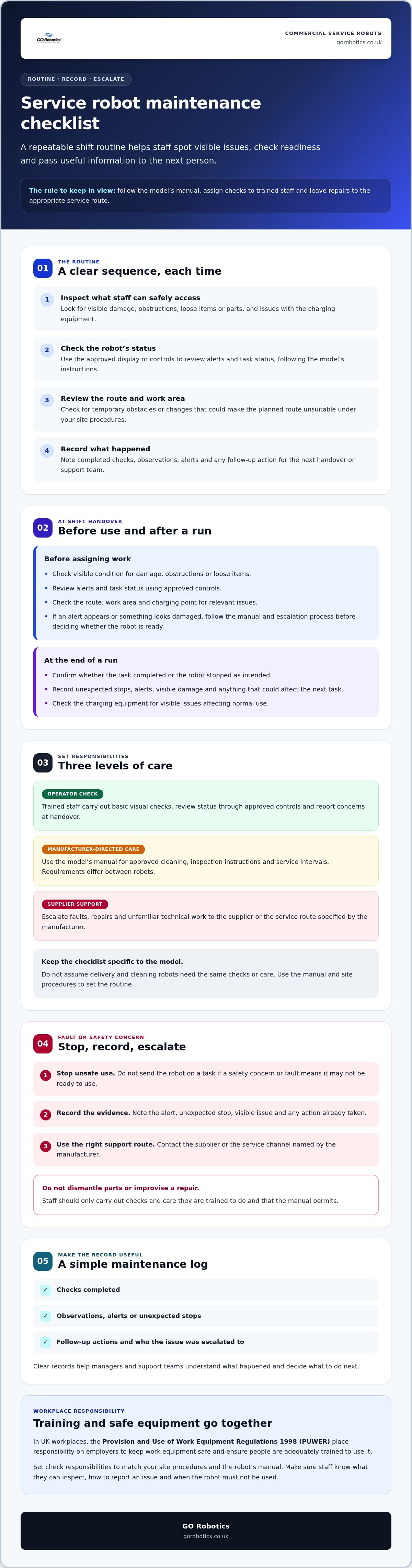
Group tasks by area, then label who should do them: operator check, manufacturer-directed care or supplier support. Clear labels set responsibilities without imposing the same timetable on every model.
- Robot: visible condition and any displayed alerts.
- Charging equipment: visible condition and any issue affecting normal use.
- Work area: route and surroundings relevant to the planned task.
- Records: checks completed, observations and follow-up actions.
Use the manual to confirm what to inspect and how often. Don’t assume cleaning robots and delivery robots share the same maintenance needs.
Who should carry out each check?
Assign basic visual checks to trained staff who handle the robot at shift handover. They should know what they can inspect, how to report an issue and when the robot must not be used. Repairs and unfamiliar technical work should go to the supplier or the service route specified by the manufacturer.
Set responsibilities to match your site procedures and the manual. Clear ownership helps prevent missed checks and stops staff taking on work they aren’t trained to do. Keep maintenance arrangements in view too, as they can depend on the model and whether you purchased it or use a subscription. GO Robotics supplies, installs and supports commercial service robots across the UK, with model guidance and ongoing technical assistance.
Before and after each shift: check the robot, route and charging point
A brief check before a task helps staff catch visible problems while there’s still time to respond. The exact steps depend on the model, so use its manual and approved controls rather than opening panels or attempting unfamiliar checks. The International Federation of Robotics describes service robots across professional and personal settings. For your team, the practical routine should reflect the robot’s role and your site procedures.
Keep the sequence simple: inspect what staff can safely access, confirm the robot’s status, then check the route and work area. A robot may pause or stop during a task, so staff should know how to monitor its progress and respond under site procedures.
Pre-use checks staff can perform
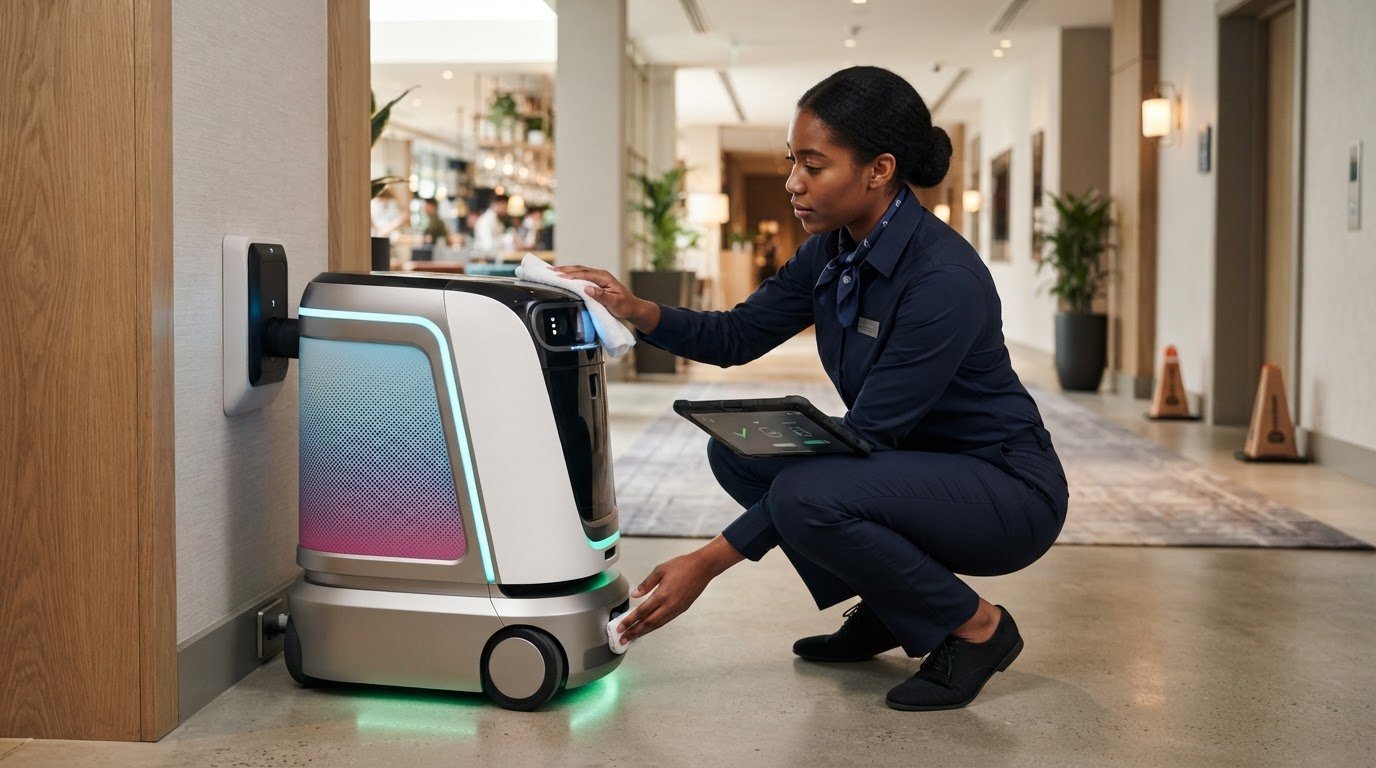
Before assigning work, trained staff can carry out a visual check and use the robot’s approved interface to confirm its status. They shouldn’t remove covers or reach into protected components. If anything looks damaged or an alert appears, follow the manual and your escalation process before deciding whether the robot is ready to use.
- Inspect visible areas: look for damage, obstructions or loose items that could affect the planned task.
- Check the display or approved controls: review alerts and task status, following the model’s instructions.
- Review the route and work area: look for temporary obstacles or changes that could make the route unsuitable under your site procedures.
These checks help staff make an informed decision before starting, rather than assuming the robot is ready because it was used on a previous shift.
End-of-run and charging checks
At the end of a run, confirm whether the robot completed its assigned task or stopped as intended. Record unexpected stops, alerts, visible damage or anything that could affect the next task. This gives the next shift useful context and helps staff avoid repeating a task before an issue is understood.
- Check the charging area for visible obstructions or damage.
- Inspect the charging connection only as directed in the manual.
- Log any charging warning and follow the manufacturer’s instructions. Don’t attempt an undocumented fix.
If a fault or safety concern remains, keep the robot out of use as required by your site procedures and contact the appropriate support route. For help matching checks to a particular model, you can ask GO Robotics about service robot guidance.
Build a model-specific service robot checklist, not a one-size-fits-all schedule
A delivery robot, a floor-cleaning robot and a reception robot do different jobs, so their maintenance checks won’t be identical. Build your service robot maintenance checklist around the exact model and its manual. Don’t transfer a cleaning instruction, component check or service interval from one robot to another.
Use the table as a starting point for organising checks, not as a replacement for manufacturer guidance. Add only tasks approved in the relevant manual, and identify whether each is for trained staff or supplier support.
| Robot category | Checklist focus | Where to confirm tasks |
|---|---|---|
| Delivery | Visible condition, trays or compartments where fitted, and readiness for the planned route | The model’s manual and site procedures |
| Cleaning and floorcare | Accessible surfaces, moving parts and any consumables specified for that model | The model’s cleaning and maintenance instructions |
| Other service robots | Accessible surfaces, moving parts and charging equipment relevant to the model | The manufacturer’s inspection and service guidance |
Match each checklist item to the robot type
Start with the areas staff can safely access, then check the manual for permitted cleaning and inspection tasks. Cleaning robots may have model-specific instructions for cleaning and consumables. Don’t assume a product or method is suitable just because it works on another unit. For more context on this category, see our commercial cleaning robot guide.
For a delivery robot, the checklist might prompt staff to look over visible surfaces and inspect trays or compartments if the model has them. Include route readiness as a separate operational check. Keep technical work, such as inspecting components that aren’t user-accessible, off the staff checklist unless the manufacturer specifically authorises it.
Set maintenance timing from approved guidance
Don’t assign daily, weekly or other intervals by guesswork. Review the manufacturer’s instructions alongside your site procedures, then set timings from that approved guidance. Record the manual’s title or version beside each scheduled task so staff and managers can see which instructions the checklist follows.
If the manual leaves a task or interval unclear, ask the supplier or the manufacturer’s support route to clarify it before adding it. Maintenance arrangements can also depend on the model and purchase or subscription arrangement, so confirm who is responsible for scheduled work. A well-structured checklist makes the routine easier to follow without treating different robots as interchangeable.
Spot a fault, record it clearly and escalate it safely
A clear fault-reporting process helps staff respond consistently and gives the supplier useful information to assess the issue. If the robot shows a warning, behaves unexpectedly or appears damaged, don’t continue the task until staff have checked the manufacturer’s instructions and site procedures.
Use a simple sequence: stop unsafe use, record what happened, then contact the appropriate support channel. Keep the robot out of service if your site procedures or the manual require it. Don’t bypass a safety feature, dismantle a component or attempt a repair unless the manufacturer has approved that work and the person doing it is qualified.
What to record when a robot reports a problem
Good notes help a support team understand the situation without staff having to guess at a cause. Add the information to your service robot maintenance checklist or fault log, then share it through the supplier’s stated process.
- Identify the unit: record the model name and any identifying details requested by the supplier.
- Copy the alert: note the exact error text or warning shown, along with when it occurred.
- Describe the task: record what the robot was doing and what staff observed just before the fault, such as an unexpected stop during a delivery.
- Include relevant history: note recent checklist entries or maintenance actions that may help clarify the sequence of events.
Stick to what staff saw or what the display reported. Don’t present a suspected cause as a confirmed fault. Follow the supplier’s instructions for sharing records or other information, and don’t send files or images through an unapproved channel.
When to stop and contact the supplier
Escalate visible damage, repeated alerts or behaviour that could affect safe operation. Staff should follow the site’s process for keeping the robot out of service and making the area safe. Don’t reset the unit, move it or try a repair unless the manual or supplier authorises that action.
Use the support channel specified for your model and purchase or subscription arrangement. If staff aren’t sure whether a warning needs escalation, ask rather than clearing it and restarting work. GO Robotics provides staff training and ongoing technical assistance. Its robot installation and staff training guide covers preparation and training for deployment.
For help with model-specific guidance or the appropriate support route, contact GO Robotics about your service robot.
Keep maintenance manageable with training, records and the right support
A checklist works best when it fits the handover your team already follows. Give staff a clear owner for each check, explain what they’re authorised to do, and show them where to record an observation or raise a concern. Training helps people follow the same process across shifts without taking on repairs they aren’t qualified to carry out.
Make records useful to the next shift
Keep the log brief, factual and easy to review. A simple entry should show:
- Date and the check completed
- Observation, including any alert or visible issue
- Action taken or follow-up needed
- Staff initials of the person who completed the check
Record unresolved issues clearly, including whether site procedures or manufacturer guidance say the robot must remain out of use. That status matters at handover. The next person shouldn’t have to infer readiness from an incomplete note. If the same alert appears repeatedly, use the log to describe the pattern and discuss it with the supplier. Records can help support teams understand what staff have already observed and done.
Plan support before a problem interrupts work
Make sure staff know which support channel to use and what information to provide, such as the model name, alert text and relevant log entries. Agree who is responsible for contacting the supplier, and check which maintenance and support arrangements apply to the selected robot and agreement. These details can vary by model and purchase or subscription arrangement.
GO Robotics’ service robot support includes installation, mapping, commissioning, staff training and ongoing technical assistance. For robots supplied through a robots-as-a-service (RaaS) subscription, maintenance packages and remote technical support are included. The applicable arrangements depend on the subscription, so confirm the specific terms rather than assuming every agreement covers the same work.
Review the checklist when the robot’s task, site procedures or manufacturer instructions change. Keep the current manual available to staff, and update the checklist so its steps remain aligned with approved guidance. This gives each shift a practical reference and helps managers see where further instruction or supplier input may be needed.
If you’d like help planning checks for a particular model, contact GO Robotics about model-specific maintenance.
Keep your robot ready with a routine your team can follow
Keeping a service robot ready for work starts with a clear routine, not guesswork. A service robot maintenance checklist should match the model’s manual, give trained staff practical checks to follow before and after a shift, and make clear when a fault needs supplier support.
Keep the routine useful by recording what was checked, what staff noticed and what action followed. These notes help the next shift understand whether the robot is ready for its task, while a record of recurring alerts gives your support team clearer context. Don’t ask operators to repair or dismantle parts unless the manufacturer has approved the work and they’re qualified to do it.
GO Robotics supplies, installs and supports commercial service robots across the UK. Staff training and ongoing technical assistance are available, and robots-as-a-service (RaaS) subscriptions include maintenance packages and remote technical support. The specific arrangements depend on the robot and agreement, so confirm what applies to your operation.
Talk to GO Robotics about maintenance planning for your service robot. With model-specific instructions, trained staff and a straightforward handover process, your team can approach each shift with greater clarity.
Frequently Asked Questions
How often should a service robot be maintained?
Use the intervals in the manufacturer’s manual for your specific model. There isn’t one schedule that suits every service robot. Separate routine operator checks, such as a visual inspection before use, from scheduled care or servicing described in the manual. Your operating pattern and site procedures can help you organise tasks, but don’t set technical service intervals by guesswork. Ask the supplier to clarify any unclear instructions.
What should staff check before using a service robot?
Staff should follow the model’s manual and site procedures. Before assigning a task, check visible areas for damage, obstruction or loose items, then use the approved interface to review alerts and task status. Confirm that the planned route and work area are suitable. Check the charging point if it’s part of your handover routine. Staff should inspect only areas they’re trained and authorised to access.
Can staff carry out service robot maintenance themselves?
Trained staff can carry out routine visual checks and any cleaning or care tasks the manufacturer’s instructions allow. Repairs, work on protected components and unfamiliar technical tasks should go through the supplier or the manufacturer’s specified service route. Make responsibilities clear in your site procedures, and train staff to recognise when to stop and escalate an issue. Don’t ask operators to dismantle components or bypass safety features without manufacturer approval.
What should I do if a service robot shows an error?
If an alert appears, follow the manual and your site’s fault procedure before continuing the task. Stop unsafe use and keep the robot out of service if the guidance requires it. Record the exact alert text, when it appeared, what task was underway and what staff observed. Then contact the appropriate support channel. Don’t clear the warning, reset the robot or attempt a repair unless the manufacturer or supplier authorises that action.
Do service robots need maintenance when they are not in use?
Follow the manufacturer’s instructions for storing and caring for the robot when it isn’t being used. Requirements vary by model, so don’t assume that leaving it switched off is enough or apply another model’s storage routine. Before putting it back into service, complete the checks specified in the manual and review any outstanding fault or maintenance records. If the storage guidance is unclear, ask the supplier for advice.
Does a Robots-as-a-Service subscription include maintenance?
GO Robotics’ Robots-as-a-Service (RaaS) subscriptions include maintenance packages and remote technical support. The exact arrangements depend on the selected robot and subscription, so confirm what maintenance is covered and what your staff are expected to handle. A subscription doesn’t remove the need for trained staff to follow the model’s routine instructions, record issues and use the agreed support channel when a fault needs attention.
What should a service robot maintenance log include?
A useful log records the date, check completed, observation, action taken and staff initials. Add the robot’s model and, where relevant, the exact alert and task underway. Note any unresolved issue and whether the robot is available for use under your site procedures. A clear service robot maintenance checklist and log help the next shift understand what happened and give the supplier useful context if you need support.