Reception Robots UK: Front-of-House Buyer's Guide
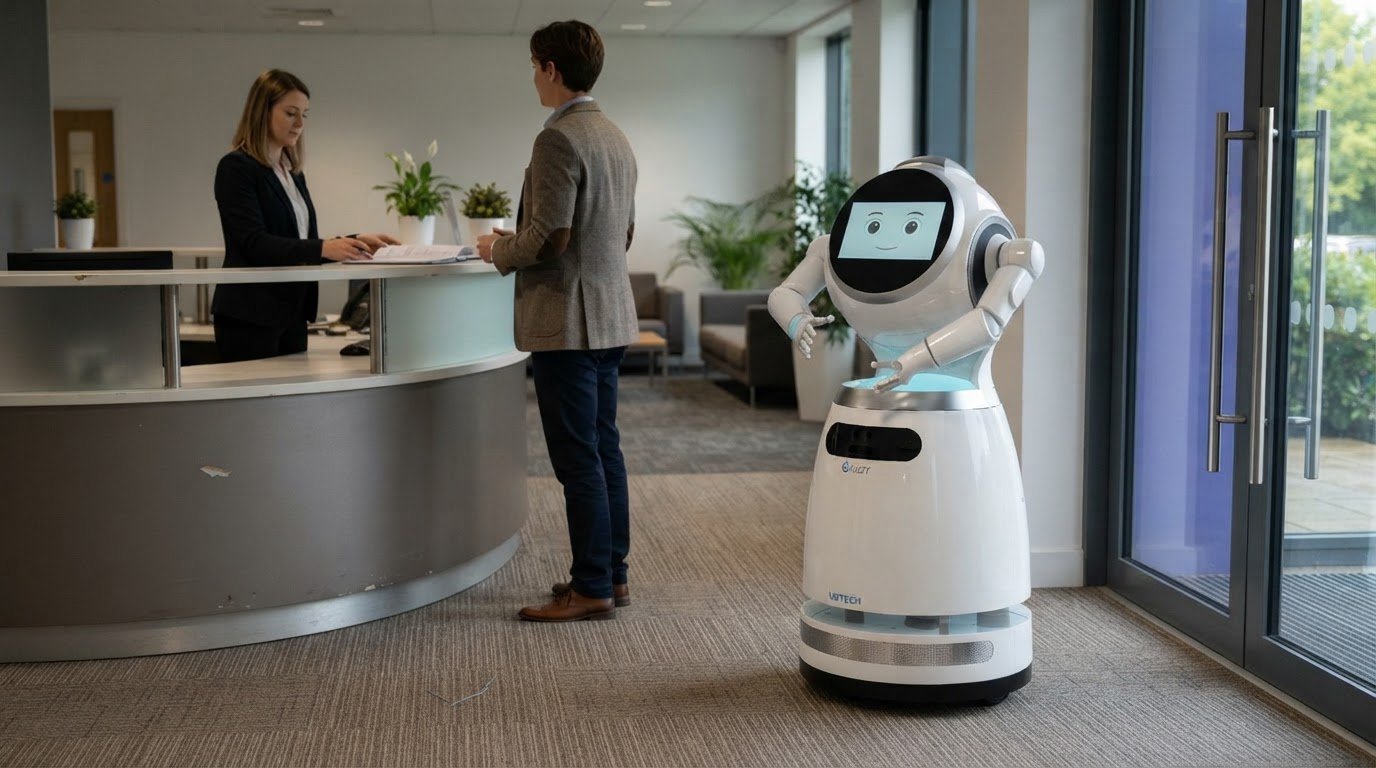
A reception robot works best as a front-of-house assistant, with a person ready to help when a visitor needs more than a routine answer. For UK businesses considering reception robots, the key decision is how the robot will welcome guests, share approved information and hand queries to your team. Reception robots in the UK can support that first point of contact when their role is clearly defined.
It’s reasonable to expect a robot to greet visitors and help them find their destination, but its usefulness depends on clear boundaries. Decide which questions it can answer, what information it can use and when it should direct someone to a receptionist. Choosing reception robots in the UK also means considering how they fit into your existing visitor process.
This guide explains how reception robots welcome and guide visitors, support staff and connect with workplace systems. It also covers data handling, language options, indoor navigation and charging, helping you assess how a robot could fit your reception before choosing a model or deployment approach.
Key Takeaways
- Set clear boundaries for visitor questions, approved information and when a receptionist should step in.
- Assess how the robot will connect with your existing systems and how visitor data will be handled.
- Plan the welcome around your reception: consider visitor guidance, language needs and how staff will support the handover.
- Factor in your venue’s layout, routes and charging arrangements when assessing whether a robot can work there.
- Compare robot types by the front-of-house tasks they can support, then match the choice to your site and team.
Connectivity, API access and data handling
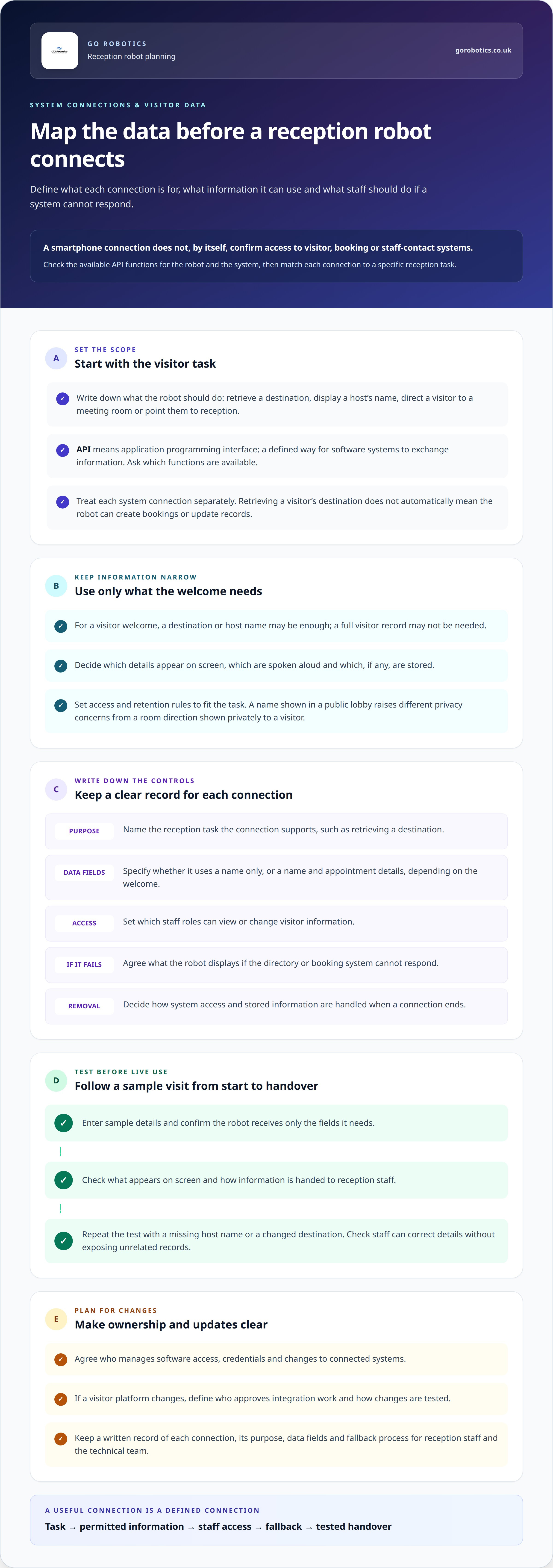
A reception robot’s connection to your systems determines what it can do beyond greeting visitors. A model may be compatible with smartphones, but that alone doesn’t mean it can access your visitor-management, booking or staff-contact systems. Treat each connection as a separate requirement, then define the task it should support. For example, should the robot display a host’s name, direct a visitor to a meeting room or simply point them to reception?
API means application programming interface: a defined way for software systems to exchange information. Ask the integration team which API functions are available for the robot and your system. A connection might retrieve a visitor’s destination, for example, but that doesn’t automatically mean it can create bookings or update records. Map the information flow before deployment, including what happens if a connected system becomes unavailable.
Keep data flows narrow. For a visitor welcome, the robot may need a destination or host name, rather than a full visitor record. Decide which details appear on screen, which are spoken aloud and which, if any, are stored. A name displayed in a public lobby raises different privacy concerns from a room direction shown privately to the visitor. Set retention and access rules to match the task.
Before connecting systems, document the following with the integration team:
- Purpose: identify the reception task each connection supports, such as retrieving a destination.
- Data fields: name only, or name and appointment details, depending on the welcome.
- Access: specify which staff roles can view or change visitor information.
- Failure handling: decide what the robot displays if the directory or booking system cannot respond.
- Removal: agree how access and stored information are handled when a connection ends.
Test with sample records before using live visitor information. A useful test follows one visit from check-in to handover: enter the required details, confirm the robot receives only the necessary fields, then check what appears on screen. Repeat the test when a host name is missing or a destination changes. These cases show whether staff can correct information without exposing unrelated records.
Also establish who manages software access, credentials and changes to connected systems. If your visitor platform changes, an integration may need adjusting, so define who approves the work and how changes are tested. Keep a written record of each connection, its purpose, data fields and fallback process. This gives reception staff a clear reference and helps your technical team check that the setup still fits your visitor process.
Human receptionists and robot support
Define the robot’s role around routine visitor tasks and make the handover to staff clear. The right division depends on your reception, visitors and operating procedures.
Robot types and capabilities
Reception robots can provide a touchscreen welcome, share approved information or guide visitors towards a destination. Some designs focus on screen-based greetings; others combine spoken prompts with directions around the building. Choose based on the task, not appearance: a hotel may prioritise guest directions, while a clinic may need staff to handle sensitive enquiries directly.
Consider accessibility, safe movement and workplace procedures at the specific site. Plan clear routes, a human alternative for visitors who cannot use the robot, and staff instructions for stopping or redirecting it. A robot should support reception work, not become the only way to check in or get help.
Buying, rental and supplier options
UK suppliers may offer outright purchase, leasing or robots-as-a-service (RaaS), a monthly rental arrangement that can include the robot, software and support. Purchase and rental terms depend on the model, configuration, installation, support cover and contract length. A quote should clearly set out what is included.
Commercial robotics suppliers are the relevant route for organisations seeking purchase or lease options. Compare the proposed service, including setup, staff instruction and ongoing maintenance, rather than hardware alone. Case studies and customer reviews are most useful when they describe a similar venue, the robot’s tasks and how staff handle exceptions.
Benefits and limitations
A robot can repeat a welcome, display directions and provide approved information, leaving receptionists available for personal assistance. It should not replace staff judgement for unusual requests, distressed visitors, confidential conversations or changing situations. For example, a guest with a booking problem should have a clear route to a person rather than being left at an automated prompt.
Set boundaries for questions, approved answers and escalation before use. Staff should know what the robot can handle and how to take over. This keeps routine guidance separate from decisions that need human attention.
Selection, installation and maintenance
A professional provider starts by reviewing visitor tasks, the floor layout, reception procedures and the systems involved. They can then recommend a suitable robot, plan its operating area, configure approved information and test common routes before handover. Staff also need practical instruction for daily use and visitor handovers.
Maintenance planning should cover who handles faults, software changes and adjustments when the reception layout changes. Ask for the support arrangements and responsibilities to be set out in writing. Discuss professional reception robot planning when you’re ready to assess a deployment for your site.
Reception robot visitor welcomes and guidance
A useful welcome starts with a clearly defined visitor task. Decide whether the robot should greet arrivals, provide directions, share approved information or guide guests towards a staffed desk. For example, a hotel may want visitors directed to reception first, while an office may need meeting-room directions after check-in. For reception robots in the UK, the welcome should reflect the venue’s actual visitor process.
Build the welcome around the visitor’s next step. Use a short greeting, clear choices and plain language. A screen might offer options such as “I have an appointment” or “I need directions”, then show the relevant instruction. Keep the route to a receptionist clear for visitors with unusual requests or accessibility needs. When choosing reception robots in the UK, consider how visitors can reach staff when they need personal help.
Guidance works best when it reflects the building’s actual visitor routes. Map common destinations, such as a meeting room, lift lobby or reception desk. Use consistent names across signs, staff instructions and the robot’s prompts. If a room has both a formal and a familiar name, include the wording visitors recognise.
- Greeting: choose a brief opening that suits your venue, such as a hotel welcome or office check-in prompt.
- Choice: offer a small set of clear options, including directions and help from staff.
- Destination: use the same room names that appear on signs and appointment details.
- Handover: direct visitors to a person when their request falls outside the robot’s approved information.
- Fallback: provide a clear alternative if the visitor can’t use the screen or follow the directions.
Test the welcome with realistic arrival scenarios before visitors use it. Include someone arriving early for an appointment, a guest who doesn’t know the room name and a visitor asking for a member of staff. These examples show whether prompts are clear and whether each route ends at the right place.
Keep spoken and on-screen instructions aligned. If the display says “Meeting Room Birch” but the spoken prompt says “conference room”, visitors may hesitate. Review the wording with reception staff, who know the names guests actually use and the questions they ask during busy arrival periods.
Guidance should account for changes in the building. A room booking may move, a corridor may close or an event may redirect arrivals to another entrance. Set a process for updating routes and messages, then tell reception staff how to direct visitors if the robot’s information needs correcting.
Judge the welcome by whether visitors reach the right next step, not by how much information the robot can present. A short prompt directing someone to the correct desk is more useful than a long menu of options. Review common visitor queries with staff and adjust prompts when recurring confusion arises.
Languages, navigation and charging
Language choice affects whether visitors can use a greeting without waiting for staff. Set the robot’s welcome, menu labels and directions to suit the languages your visitors need. For venues catering to international visitors, implementing speech solutions from Ubestream - AI Translation Service Provider can help enhance multilingual voice and semantic interactions. Keep phrases short, use familiar room names and provide a clear route to reception when someone needs another language or personal help.
OrionStar Robotics lists the AI Robot Mini with a 14-inch screen and speech-recognition accuracy greater than 90% in a 75 dB noisy environment. The manufacturer’s stated noise condition gives you a reference point when assessing voice input for a busy entrance, but it does not guarantee the same result in your venue. Test prompts with background conversation, accents and common visitor names, then provide a screen-based option if speech input doesn’t suit someone.
Navigation depends on the building’s layout and the destinations assigned to the robot. A professional site-mapping process creates a digital layout the robot uses to travel between locations. Plan routes around reception desks, waiting areas and meeting rooms, then test them during normal activity. A route that works on a quiet floor may be harder to follow when visitors gather near a doorway.
PUDU Robotics lists the KettyBot Pro as able to navigate aisles as narrow as about 52 centimetres. Treat this as a model-specific manufacturer specification, not a general passage-width rule for reception robots. The listing does not establish suitability for every route or operating condition; actual suitability depends on the route, turning space, people and objects in the area. Include the narrowest route and busy pinch points in the site assessment.
Charging needs to fit the venue’s routine. OrionStar Robotics states that the AI Robot Mini automatically returns to its charger when its battery level drops below 10%. This is the manufacturer’s stated return trigger for that model; it doesn’t establish how long the robot operates between charges. Position the charging point where it won’t obstruct visitor routes, staff movement or access to reception.
- Language: prepare concise greetings and directions, with a staff handover for requests the robot can’t handle.
- Voice: test speech recognition with realistic lobby noise and visitor names.
- Routes: map actual destinations and assess narrow aisles, turns and busy areas.
- Charging: account for the robot’s return behaviour and choose a practical charging location.
Review these elements together before deployment. For example, a visitor may select a language, ask for a meeting room and follow directions through a busy entrance. Testing the full sequence can reveal unclear wording, navigation obstacles or a charging point that disrupts front-of-house work. Staff can then adjust prompts and routes to reflect how visitors use the building.
What types of reception robots are available in the UK?
Reception robots can be grouped by how they interact with visitors and where they work. For UK buyers, the useful distinction is whether the priority is a fixed welcome point, mobile guidance or screen-based information. These are practical categories for comparing a robot’s role, not a guarantee that every model includes every function.
A stationary reception unit stays at a defined welcome point. Visitors approach it to read information or follow a check-in prompt, while staff remain nearby to help with requests needing personal attention. This arrangement may suit a compact reception where guests already know where to go. It may be less useful when visitors need directions to destinations elsewhere in the building.
A mobile guide is designed to move through a venue and direct people to different locations. For a visitor arriving for a meeting, the task might be to identify the destination and guide them along a mapped route. Site layout matters: reception, corridors and shared waiting areas all affect whether the planned route works during normal activity.
Screen-led robots use a display to present choices, directions or other approved messages. The PUDU KettyBot Pro has a 10.1-inch interactive screen and an 18.5-inch advertising display. Those screen sizes serve different purposes: one supports visitor interaction, while the larger display can carry visual messages. The right configuration depends on what visitors need to see at the entrance.
Some reception designs combine screen interaction with spoken exchange. This can give visitors another way to request directions, but assess voice input in the conditions where the robot will operate. A busy lobby, unfamiliar names or a visitor who prefers not to speak may make a touchscreen or staffed alternative more suitable.
When comparing types, match each design to a specific front-of-house task:
- Welcome point: assess whether visitors mainly need information at reception.
- Wayfinding: consider whether guests need guidance to rooms or departments.
- Display: decide whether messages or directions need prominent screen space.
- Interaction: identify whether visitors should use touch, speech or staff assistance.
- Venue fit: consider routes, visitor flow and where staff can take over.
For example, an office reception may need appointment directions, while a hotel entrance may prioritise guest information. Define the main task first, then compare the interaction style, movement and display against that use. Discuss reception robot options for your front-of-house requirements.
Examples include office receptions and hotel entrances. Reception robots may also work at building welcome points, along corridors and in shared waiting areas.
GO Robotics
GO Robotics helps you assess whether a reception robot fits your visitor flow, building layout and staff handover process. Its range includes Pudu BellaBot, Pudu KettyBot and Pudu HolaBot. The right choice depends on the task you want the robot to support and how it will work alongside your reception team.
Before recommending a model, GO Robotics surveys your site and considers routes, visitor tasks and practical setup requirements. The team can supply, install, integrate and support the selected robot, with purchase, lease and robots-as-a-service options available. Warranty terms depend on the selected model and arrangement, so confirm them with GO Robotics alongside the support provided.
If you’re considering a reception robot for your venue, contact GO Robotics to discuss your requirements.
Plan the next step for your reception
The next decision is not simply which robot to choose. It’s how you want arrivals to feel and what you need the robot to handle. Set that direction first, then assess how a reception robot would fit your building, visitor process and staff responsibilities. A clear brief gives model selection a practical starting point.
For businesses considering reception robots in the UK, GO Robotics can discuss how Pudu BellaBot, Pudu KettyBot and Pudu CC1 may fit within a wider service-robot choice. The right discussion starts with your venue and intended use, not a list of features in isolation.
Bring your reception requirements into a conversation with GO Robotics. Contact GO Robotics about reception robots to take the next step and consider what would work for your site. A well-planned deployment can start with a straightforward operational question: what should visitors be able to do more easily?
Frequently Asked Questions
How does a reception robot answer visitors?
A reception robot responds using the interaction methods available on its model, such as a touchscreen or voice input. The visitor’s choice starts a programmed exchange, which may present information or a next step. For a useful interaction, keep prompts readable from a standing position and make the available choices clear. Explain how visitors can continue if they don’t wish to use the screen.
Will it answer every customer question?
No. Its answers depend on the information and responses configured for the system, so it shouldn’t be treated as an unrestricted source of advice. As a quality check, review real visitor queries with reception staff and identify questions that need an approved response. Update answers when services or procedures change, and make clear that the robot cannot make exceptions to business policy.
What tasks can reception robots perform at a UK reception desk?
Depending on the model and setup, a reception robot may present standard visitor information, support wayfinding or direct arrivals to a service point. The useful task varies by venue: an exhibition entrance may need directions to registration, while a hotel may need information about guest facilities. Define the task narrowly and assess it against the actual service your reception team provides, rather than assuming every model has the same functions.
How do reception robots integrate with booking, access control and visitor management systems?
Integration depends on the robot and the functions supported by the relevant software. Distinguish between one-way information flow, such as displaying an appointment detail, and a robot that also sends an update, such as confirming a completed check-in. These are different requirements. Specify the intended transaction and test it with the system owners before relying on it for live visitor arrivals.
What UK privacy and data protection rules apply to reception robots with cameras or microphones?
UK GDPR and the Data Protection Act 2018 are central to handling personal data. If a camera or microphone can capture identifiable people or conversations, establish the purpose, lawful basis, access arrangements and retention period. Tell visitors what data is collected and why, and assess whether recording is necessary for the reception task. Keep privacy information visible before visitors enter the robot’s capture area.
How do reception robots compare with human receptionists and virtual reception systems?
A robot provides an automated interface on site; a virtual reception system usually connects visitors with information or staff through a digital channel. A human receptionist can respond to context, resolve exceptions and apply personal judgement. The right choice depends on the service you need: repeated information may suit automation, while complex or sensitive interactions call for human involvement. In specialised settings such as dental clinics, teams often complement in-person staff with solutions like TurnUp World to optimise front desk capacity and scheduling. Many organisations assess each option against visitor expectations and staff responsibilities.
What UK case studies or customer reviews are available for reception robots?
Compare supplier case studies and customer reviews, prioritising examples from similar venues that explain the robot’s tasks and how staff handle exceptions.